Start here
Quickstart: your first investigation in 10 minutes
Install the desk, sign in, and get a cited root cause on a real ticket. No connector needed to start.
10 min read
Who this is for
Solvaro is an investigation desk for support engineers at every tier: CSE, TSE, L1 through L3, and the escalation engineers behind them. You bring a ticket; Solvaro reads it with its logs and attachments, checks your code and your team’s past cases, and gives you a root cause with the evidence, a workaround, and a draft you approve before anything goes out.
1. Install (2 minutes)
- Open the Download page and pick your build: Mac Apple silicon, Mac Intel, or Windows.
- Mac: drag Solvaro to Applications, then right-click the app and choose Open the first time (the build is not notarized yet).
- Windows: if SmartScreen shows “Windows protected your PC”, choose More info, then Run anyway.
2. Sign in (1 minute)
- Open Solvaro and choose Sign in. Use email or Google.
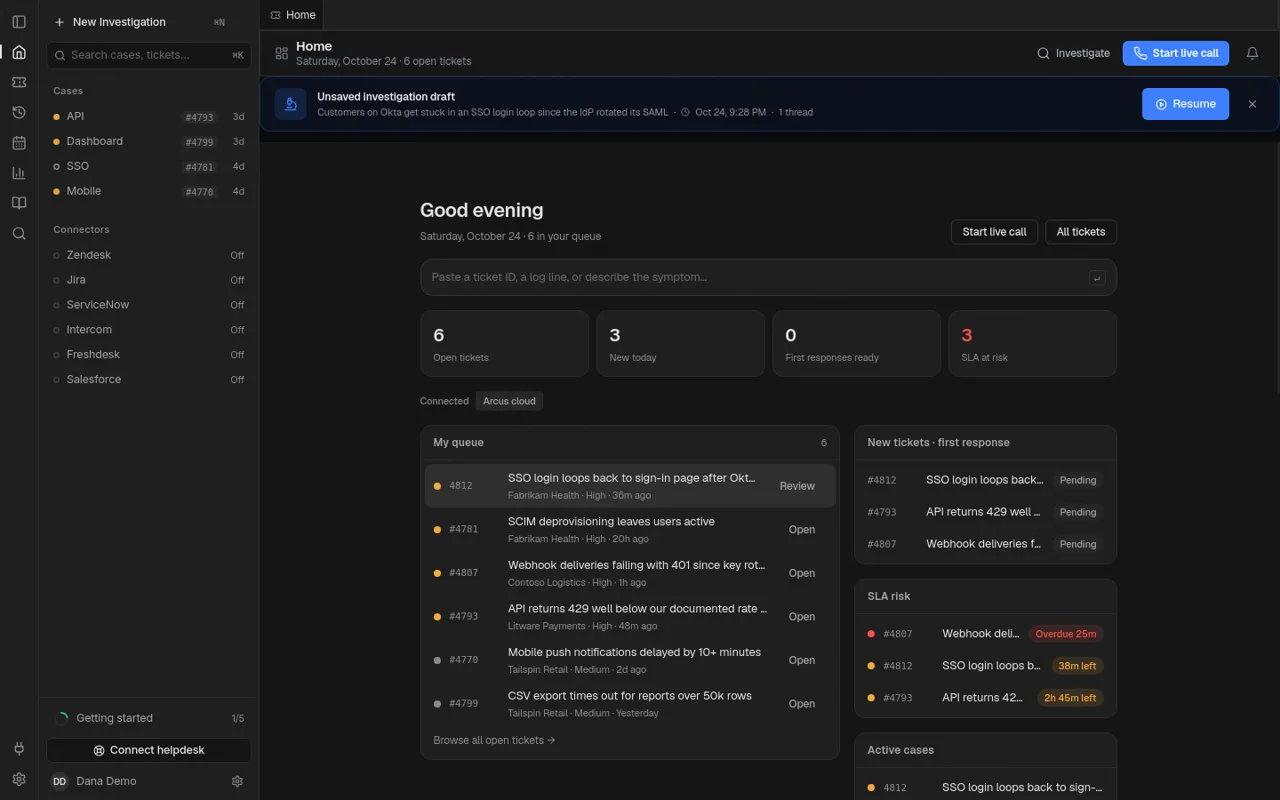
- You land on Home. If your org has no helpdesk connected yet, Home shows sample tickets so you can try everything right away.
3. Investigate a ticket (5 minutes)
- In the box at the top of Home, paste a ticket ID, a log line, or describe the symptom, then press Enter. Or click a ticket in My queue.
- Solvaro opens a case and starts working. You see what it is reading as it goes.
- Read the answer from the top: what it thinks is happening, the root cause with a confidence score, the evidence (ticket, log lines, file and line in code), what it ruled out, and a workaround.
- Ask a follow-up in the box at the bottom, in plain words. For example: “Why did this start today and not last week?”
4. Act on it (2 minutes)
- Rate the answer with the thumbs under it. A confirmed answer teaches Case Memory, so the next engineer with the same symptom gets it faster.
- Open ⋯ → File another bug / feature request to get a bug draft built from the investigation. Preview it, then Copy markdown or, once a tracker is connected and external posts are on, file it.
- Choose Finish & save when you are done. The case goes to History with its findings. Leave keeps it as a draft instead.
Make it yours next
- Connect your helpdesk so Home shows your real queue: see Connect your helpdesk and tools.
- Add a local repository folder in Settings → Integrations → Local repositories so answers can cite your code. The index stays on your computer.
- Ask your org admin which AI provider your org uses: see Choose your AI provider.
Next
Connect your helpdesk and tools
What connects today, how to connect it, and what is not there yet.
How investigations work
What Solvaro reads, how it reaches a root cause, and how to check its work.
Choose your AI provider (and bring your own key)
Each org picks the one AI provider that receives its data. Optional: use your own API key.