Security and trust
Support data stays yours. Customers only see what you approve.
Solvaro works with tickets, logs and calls. This page explains what we protect, how, and what is not done yet.
How we protect your data
Data isolation per org
Every API request is checked against your org membership. Resolution memory, insights and history never mix between orgs. Cross-org déjà vu matches are off unless you opt in, and even then they are capped at medium confidence.
Encryption
All traffic uses HTTPS. Hosted database volumes and backups are encrypted at rest with AES-256 by Railway. Desktop connector tokens are kept in the operating system keychain. Org OAuth client secrets and bring-your-own AI keys are encrypted at the application layer (Fernet) before they are stored.
Data retention
Org admins choose how long Solvaro keeps call history and ticket/investigation data (30, 90 or 365 days, or forever). Defaults: call history kept until you set a limit; ticket and investigation data kept for 365 days. A background job purges expired records. Admins can erase a customer by email, or request deletion of all org product data from Settings.
Approval before anything public
Solvaro writes internal notes on its own. Anything a customer or another team will see (a public reply, a Jira bug, a Slack post) waits for your approval. Auto public replies are off by default and never run on urgent or critical tickets. When a ticket has a linked Jira issue, a technical internal comment can be added on Jira in addition to the customer-facing helpdesk reply.
Leak guard
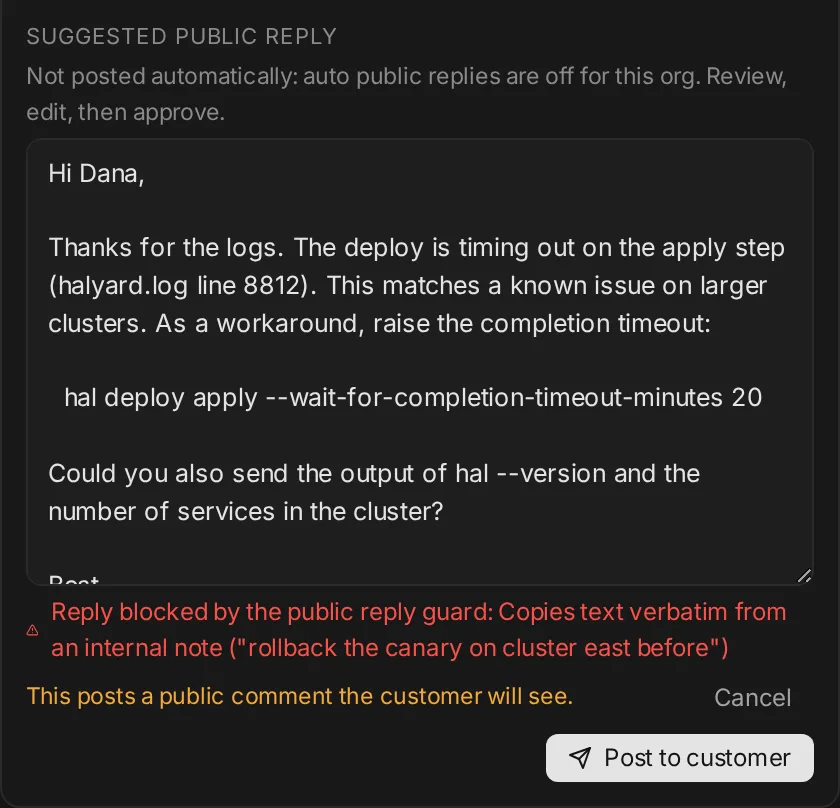
Before a public reply can be posted, it is compared with the ticket’s internal comments. Verbatim internal text, internal-only fixes and internal links block the post and show the reason.
Audit log
Actions are written to a structured audit log with personal data scrubbed. Each first-response run records whether it posted, skipped or failed, its confidence and the public decision. Retention policy changes and delete-all requests are logged.
Access controls
Org admins manage retention, SSO, seats, billing and connectors. Members use the product without those controls. Require SSO for your domain when you are ready.
Least privilege connectors
Zendesk, Freshdesk, Intercom, ServiceNow, Jira, Salesforce and Slack use the token or app your team creates, with the scopes you grant. Disconnect any time in Settings.
The guard in the product
A suggested reply that copied text from an internal note. Posting is blocked until it is fixed.
Status at a glance
| Control | Status | Details |
|---|---|---|
| Per-org data isolation | In place | API routes check org membership on every request. Déjà vu, insights and call history are scoped to your org. |
| Encryption in transit | In place | HTTPS only, with TLS terminated at the host and HSTS set. |
| Encryption at rest | In place | Hosted PostgreSQL volumes and backups are encrypted with AES-256 by our host (Railway). Connector credentials and bring-your-own AI keys are encrypted at the application layer with Fernet before storage. |
| Credential storage | In place | Desktop connector tokens live in the OS keychain (safeStorage). Org OAuth client secrets are encrypted at rest (Fernet) and never stored in plaintext after save. |
| Data retention | In place | Org admins set how long call history and ticket/investigation data are kept (30 / 90 / 365 days or forever). A scheduled job purges expired records. Admins can erase a customer by email or delete all org product data. |
| Approval before public posts | In place | Public replies, Jira bugs and Slack posts need an explicit approval. Auto public replies are off by default. |
| Public reply guard | In place | Drafts are checked against internal comments before they can be posted. |
| Audit log | In place | Structured audit events with PII scrubbing, including retention changes, delete-all requests, and every first-response run. Org admins can filter and export it as CSV. |
| Access controls & roles | In place | Org admin vs member roles gate retention, SSO, billing and connector setup. SAML / OIDC SSO with optional required-SSO for a domain. |
| Sign-in | Google, GitHub, email, SSO | OAuth sign-in with Google or GitHub, email, or your company SSO. |
| SAML / enterprise SSO | In place | SAML 2.0 and OpenID Connect SSO with SCIM 2.0 user provisioning, tested against Okta and Microsoft Entra ID (Azure AD). Admins can require SSO for their domain. |
| SOC 2 | Not certified | We hold no certifications today. SOC 2 is planned but not started; we will not claim otherwise. |
Subprocessors
Core infrastructure: Railway (API, PostgreSQL, Redis), Cloudflare Pages (marketing site), Deepgram (call transcription when you use calls), DuckDuckGo (public web search during investigations), Stripe (billing). AI model providers process investigation context only for the provider your org selects. The full list, with data categories and locations, is on the subprocessors page.
What leaves your machine
- Live call audio is streamed to the Solvaro API and transcribed while the call runs.
- Ask sends only the context you include: ticket, notes, transcript and code snippets.
- Your local code index stays on your computer. Snippets are sent only when you ask about them.
- Screen stills stay on your computer until you send them.
See the subprocessors list and the privacy policy. Report a vulnerability to daarishlomo@gmail.com.